Tour Schedule Shown in Units other than Minutes
From Timegate v21.4, users will be able to view tour schedules in hours, days, weeks, months or minutes. In previous versions of Timegate, this has only been possible in minutes. The use of minutes alone could be confusing to employees. It could, for example, set a false expectations for those tours that operate over a duration greater than 999 minutes (approximately 16.5 hours). This was the minute limit set in previous releases of the software and may be interpreted as an expected duration rather than a system limitation for a tour that may take a longer time to complete.
A user will be able to select between an Hourly, Daily, Weekly or Monthly recurrence pattern using a drop-down list in addition to minutes. Depending upon the recurrence pattern selected, the screen display will change as follows:
-
Hourly recurrence pattern – Pre and Post window values are represented in minutes and hours
-
Daily/Weekly/Monthly recurrence patterns – Pre and Post window values are represented in Minutes, Hours and Days
An example of the options is shown below:
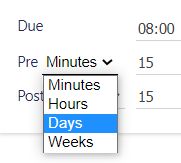
Note: When entering values, only whole numbers are valid – you cannot enter decimal values. If a user switches the value, for example between minutes and hours the numeric value will remain the same e.g. 5 minutes will switch to 5 hours. If, however, the entered value is not supported by the new option e.g. 36 minutes changes to 36 hours, an error message will be displayed indicating the acceptable range of values that can be entered. When scheduling the tours, it is possible to have one post displayed in minutes and another in hours.