Provision of "Not Applicable" Answer within Forms
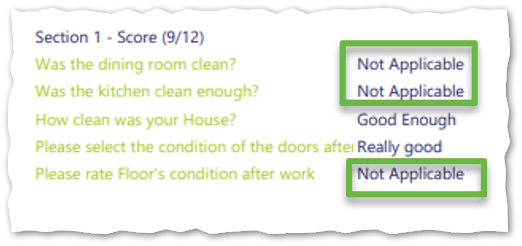
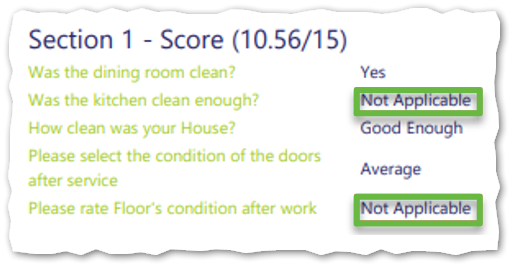
In Timegate 21.4, support has now been added enabling users to select "Not Applicable" as a response when completing questions in a form or incident. i.e. the end-user can state that the question does not apply to their situation. If the question is being used in a scorable form, the answer will not have an impact on the overall form score.
Once the form has been completed, when selected "Not Applicable" responses are shown on the forms when viewed through the Service Desk and when downloaded as a PDF file as well as through “read-only” emails ( link to the results sent by email to someone without Timegate credentials).
From within the view mode in Service Desk, if a form uses a not applicable answer, the form will contain this answer. In those forms where scores are calculated and displayed if all questions are answered with Not Applicable, N/A is shown for both Section Score and Score. When viewing the score for the form, there is a small icon displayed next to the score field. When they hover over the icon, the following text is displayed, "Score is N/A because all questions were provided with a Not Applicable answer"
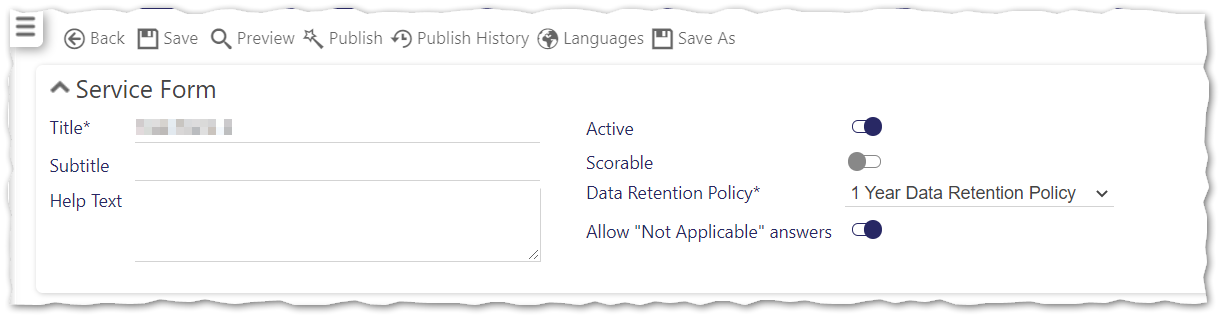
To enable support for the "Not Applicable" answer to a question:
-
Open or create the form from within Admin | Forms | Service Forms
-
Select Allow "Not Applicable" answers as shown below:
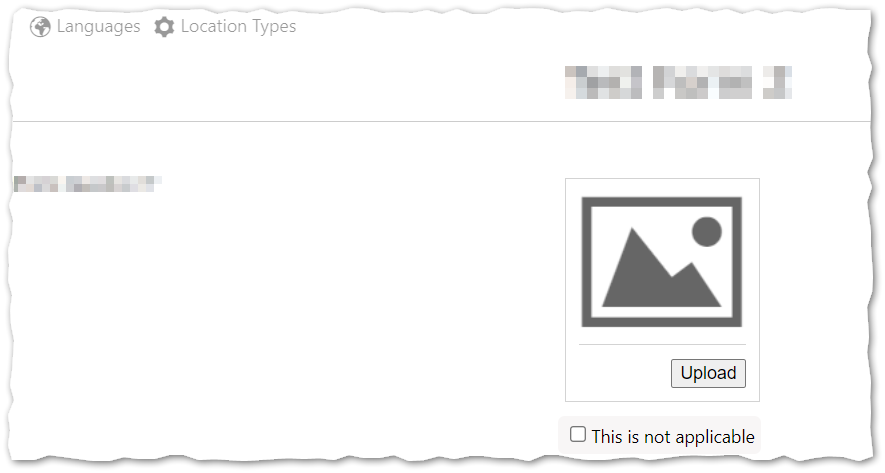
When the form is being completed, a Not Applicable option will be shown that can be selected (as appropriate) when using either a mobile device or within the Service Desk. An example is shown below:
The following are examples of a completed form responses that employ the Not Applicable option: