Incoming Messages Monitoring for Troubleshooting
Overview
This new monitoring screen (accessible from Monitor | Incoming Messages) enables you to diagnose any failed duty messages from the auto response features within Timegate. You can see the message, when and where it originated (by email or text message), along with the current status of the message and any associated error message. Additionally, you could use the system to display any message sent into the specified customer email address enabling you to see any auto replies from escalation group users and any messages sent in from employees.
An example of the screen is shown below:
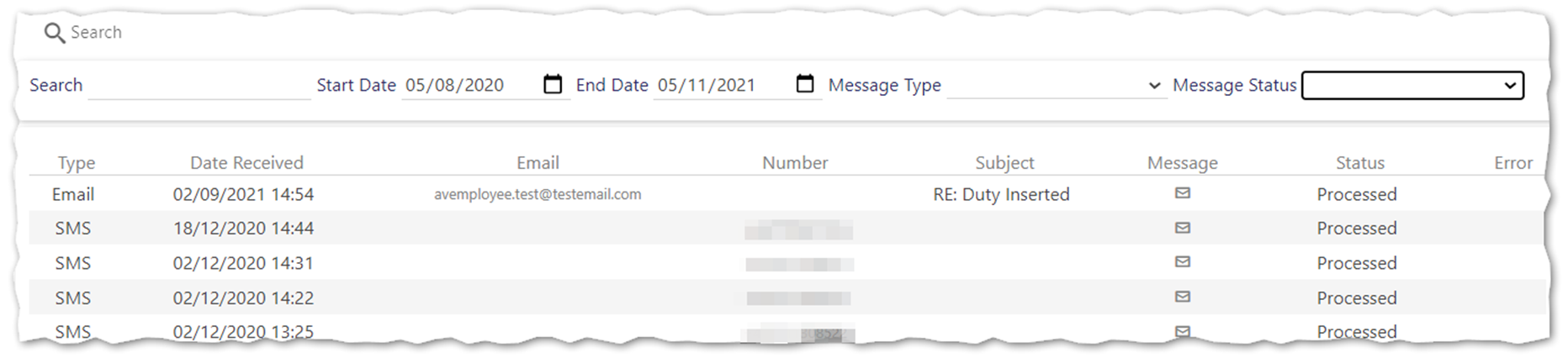
Searching for erroneous incoming messages
The Incoming Message log screen has a series of filters that enable you to search for incoming messages as follows:
-
Select your Start Date and End Date (by default these are set to cover the previous month)
-
Select a Message Type as appropriate (Email or SMS). By default both Email and SMS messages are shown
-
Select a Message Status - if you are looking for those messages that have failed, you should select Parse Failed or Processing failed (see details below. By default all Message Status are shown
-
Enter a Search criteria as appropriate
-
Select Search
Message Status
One of the following Message Status values is displayed indicating the current state of the message:
- Queued - message is queued and awaiting processing
-
Processed - message has been processed
-
Parse Failed - YES or NO cannot be found in the message by the system
-
Processing Failed - the system tries to process the message but no response code was found allowing it do so
Viewing the error
To view an error message as applicable, select the error icon displayed under the Error column within the message log entry
Viewing the content of a message
To view the content of a message, select the envelope displayed under the Message column within the message log entry
Viewing employee records
If you wish to view the employee record for a given message log entry, select Email address or Number