Service Desk - PDF downloads enhancement when showing rating questions
The following 01 min 29 sec clip shows you how to view the score achieved and the total available score when viewing and download of an Incident, Tour or Form from within the Timegate Service Desk:
 Description of Update
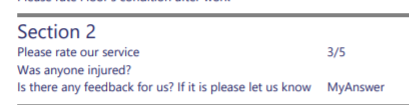
When reporting on scores achieved in rating questions, through the Service Desk for incidents, forms or tours, the score achieved and total available score are both shown. An example is shown below where 3 marks out of 5 has been achieved: