New Site View
The following 3 min 01 sec clip shows you how to configure Slots in Site View:
The following 7 min 18 sec clip shows the Pay and Billing Hours (Side Budget) information that is now available in the Site View:
 Description of update
The overall look of Site View has been simplified, whilst it’s functionality has been enhanced, in the latest version of Timegate. When a user first opens this page, it is fully expanded showing five areas:
- A Search bar
- A toolbar
- Pay and Billing Hours (Side Budget) information
- The Site View header
- The Site View grid (comprising the various duties)
These are shown in the screen shot below:
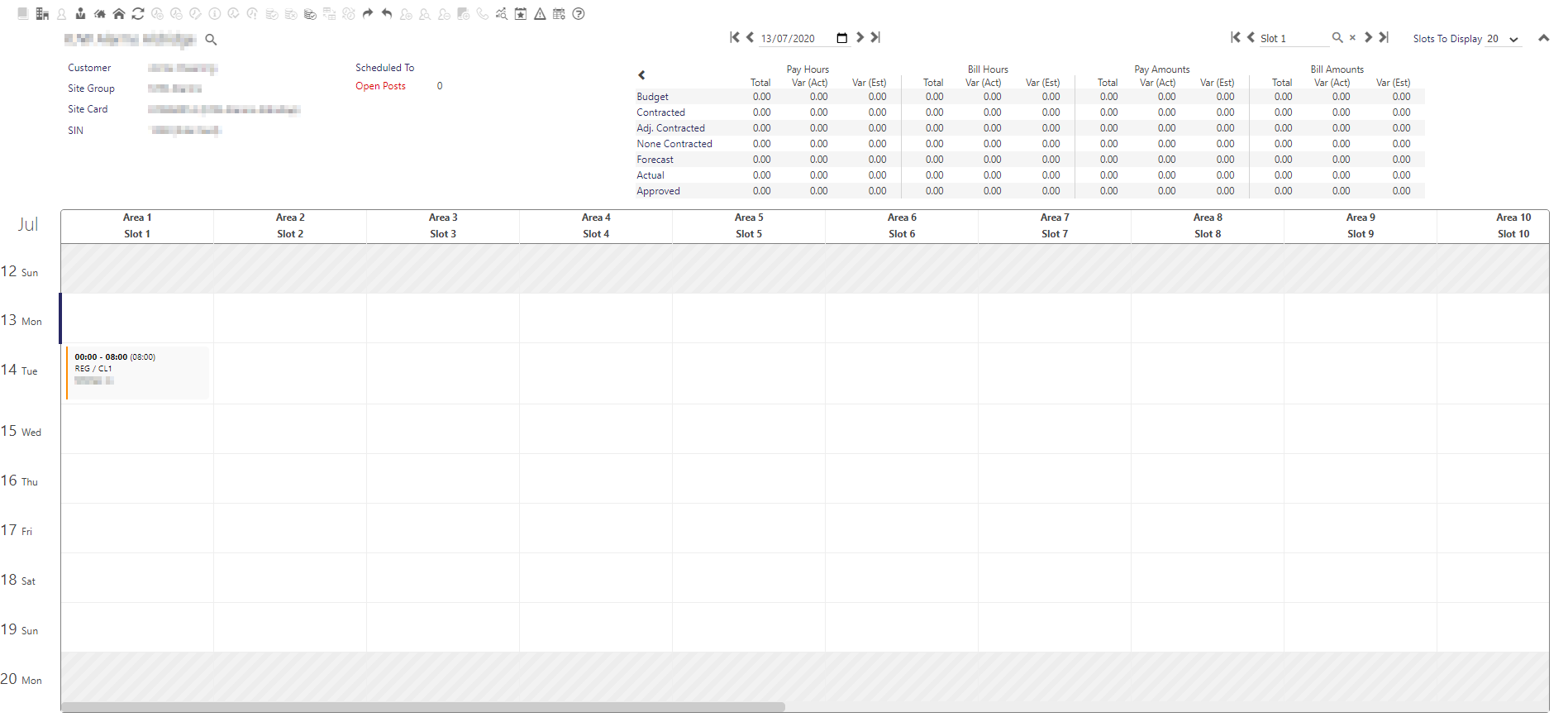
A Pay and Billing Hours information table similar to that which can be found in Team View has been included on this page. Budgeted hours, contracted hours, adjusted contracted hours, forecast hours, actual hours and approved hours are all shown for both pay and bill hours. Using this information, you will be able to track spending and undertake budget reviews.
The Search Bar has been given a fresh look and feel. It includes the ability to search by site, by date and by slot.
Finally, the Site View grid takes on a new look for version 20.2. The Areas, Posts and Slots are shown across the top of the grid (see clip below). These are fully configurable within the Web Client - you are able to rename them to more user friendly names for your business, instead of the defaults. The days of the weeks are shown down the rows of the grid. New, fresher looking duties are displayed in the matrix. The duties, when selected can be actioned using the context sensitive tool bars or right-hand mouse button menu options. Additionally, drag and drop functionality is used for tasks such as moving duties.